Accounting Software Coding
Cash Coding in Xero Accounting: A Detailed Setup Guide
13-11-24
Xero Accounting is one of the leading cloud-based accounting platforms designed to help small and medium businesses streamline their financial processes. One of its powerful features is cash coding, which allows for efficient and accurate handling of bank transactions. In this blog, we will cover how to set up cash coding in Xero, its benefits, and how 360 Accounting Pro Inc. can help you utilize it to its fullest potential.
What is Cash Coding in Xero?
Cash coding in Xero Accounting is a feature that simplifies the process of reconciling multiple transactions at once. It is particularly useful when dealing with a large volume of bank transactions, as it allows users to assign appropriate cash codes quickly, categorize expenses, and reduce time spent on manual data entry.
With cash coding, business owners can speed up their bookkeeping and ensure that their bank transactions are accurately classified.
How to Set Up Cash Coding in Xero Accounting
Setting up cash coding in Xero Accounting is straightforward. Below is a step-by-step guide on how to start using cash coding:
1. Enable Cash Coding in Xero
First, you need to ensure that cash coding is enabled for your Xero account. Typically, this feature is accessible to users with the role of a Xero Advisor or bookkeepers who have been granted access.
Xero Give Accountant Access: If you want your accountant to manage cash coding for you, you need to give your accountant access to your Xero account. This can be done by inviting them from the user settings.
2. Navigate to Cash Coding
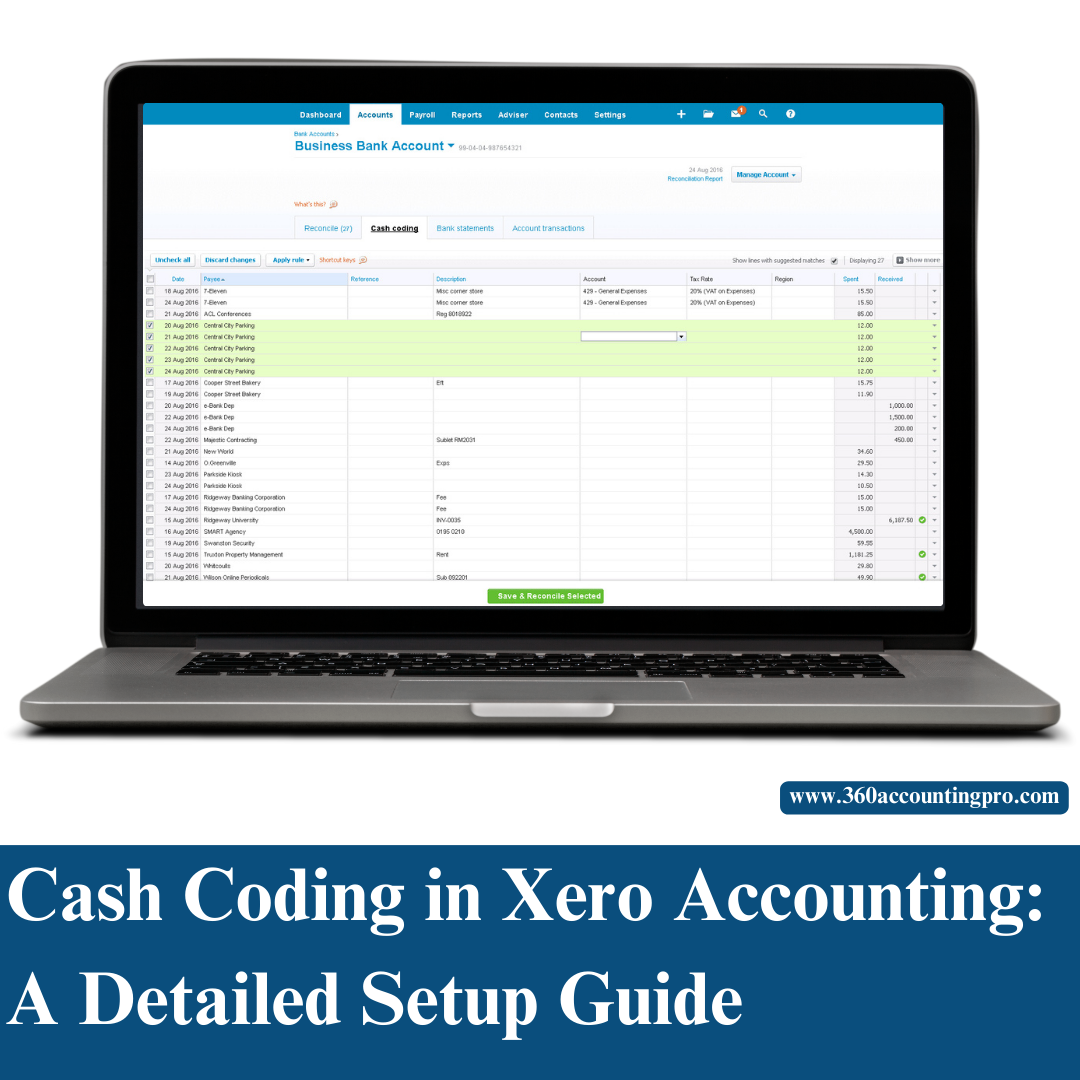
Xero Accounting How to Use Cash Coding: Go to the "Accounting" tab in Xero and select "Bank Accounts." From here, click on the specific bank account that you want to reconcile. Once inside, select the "Cash Coding" tab.
3. Categorize Transactions
In the cash coding screen, you can see all unreconciled transactions listed. Here, you can add descriptions, select the appropriate cash codes, and categorize each transaction with ease.
Xero Cash Coding Transfers: Cash coding can also be used to record inter-bank transfers, which helps in simplifying internal cash flow management.
4. Save and Reconcile
Once all the transactions have been properly categorized, you can save and reconcile them all in one go, ensuring that your bank feeds are up-to-date.
Benefits of Using Cash Coding in Xero Accounting
Speed and Efficiency
With cash coding, reconciling transactions becomes significantly faster, as you can categorize multiple entries at once.
Improved Accuracy
The ability to bulk reconcile transactions minimizes the risk of human error, resulting in more accurate financial data.
Streamlined Processes
Cash coding also simplifies the process of categorizing recurring transactions, making bookkeeping easier for small business owners.
Cash Coding and Xero Accounting for Different Sectors
Xero Accounting is versatile and suitable for a variety of business sectors. Whether you're running a nonprofit, a restaurant, or a manufacturing business, cash coding can be a game-changer. Here’s how it helps:
Xero Accounting for Non Profit Organisation: Cash coding helps nonprofits maintain accurate records of donations, grants, and operational expenses.
Xero Accounting for Restaurants: For restaurants with numerous daily transactions, cash coding helps to quickly classify sales, purchases, and expenses.
Xero Accounting for Farming and Manufacturing: Farmers and manufacturers deal with multiple types of transactions, and cash coding helps keep these organized and easy to manage.
Xero Accounting vs. Other Platforms
Many businesses often compare Xero Accounting vs. Sage 50 or other accounting software. One key advantage that Xero Accounting has is its beautiful accounting interface and user-friendly approach to cash coding.
Additionally, Xero Accounting integrates well with other tools like Gusto for payroll, allowing you to manage your finances and HR in one place. Xero and Gusto together make financial management and payroll processing seamless for small business owners.
How 360 Accounting Pro Inc. Can Help You with Cash Coding in Xero
Setting up and using cash coding effectively requires a certain level of expertise, especially when it comes to ensuring that all your transactions are properly categorized. That’s where 360 Accounting Pro Inc. can assist.
Expert Xero Advisors: We have certified Xero Advisors who are well-versed in Xero Accounting and can help you with everything from setup to ongoing support.
Training and Support: If you're new to Xero Accounting, we offer Xero Accounting Training and even Xero Accounting Courses that are designed to help you understand the platform fully, including how to use features like cash coding.
Troubleshooting: Encountering problems like Xero Accounting Not Working? Our team is here to troubleshoot and ensure that everything runs smoothly, from Xero Accounting Bank Feeds to cash coding and beyond.
Conclusion
Cash coding in Xero Accounting is a powerful tool that simplifies the reconciliation of bank transactions, saving you time and ensuring accuracy. Whether you are new to Xero or an experienced user looking to get more out of the platform, 360 Accounting Pro Inc. can provide the expertise and support you need.
Ready to streamline your bookkeeping with Xero? Contact 360 Accounting Pro Inc. today to find out how we can help you make the most of Xero Accounting and improve your financial management processes.
Tags : #XeroAccounting, #CashCoding, #XeroBookkeeping, #AccountingSoftware, #CloudAccounting, #BusinessBookkeeping, #XeroExperts, #SmallBusinessAccounting, #QuickBooksVsXero, #FinancialManagement, #XeroTraining, #XeroAdvisor, #OnlineAccounting, #BankReconciliation


Comments
Post a Comment